Do you belong to the League of Curious Minds, pondering how much does it cost to build a Shopify website?
Well, the answer is that you are not alone in this. Most business owners and entrepreneurs have a common query running over their heads. At whatever level you may be, it’s important to know the cost of getting started with your online store.
Let us explore further details and come to know all the important points to take care of.
Why Shopify?
User Friendly Platform

One great pro is the user-friendly UI at Shopify. Setting up and managing an online store has been made easy and convenient, even for those who are not technically proficient, by Shopify.
The platform offers an intuitive interface to easily manage many areas—product listings, orders, and customer information. This is very important for users to save time and be able to concentrate on growing their business rather than understanding complex technological aspects.
Customization
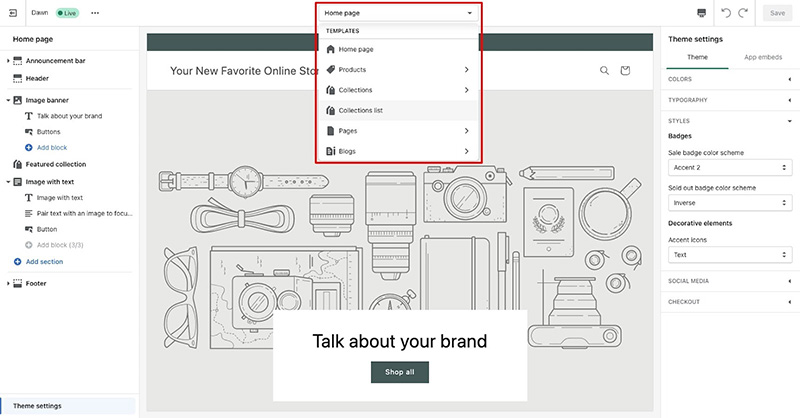
Shopify provides you with lots of templates and customization opportunities to build an inspiring and engaging online store. It has a variety of premium, free designs to fit every kind of business and taste. Most importantly, you don’t have to know how to code to easily customize your website using Shopify’s drag-and-drop builder tool!
Also read: An Ultimate Guide to Inclusive Web Design
Shopify only provides HTML and CSS access for those who need very advanced functionalities, which makes customization much more extensive. This flexibility ensures that the look and feel of your store can be achieved to your satisfaction.
Speedy Apps

Another of the main draws for Shopify is its App business, which offers a ton of appropriate apps and plugins that may extend your business capabilities. All have been applied accordingly so that, no matter what you need, you will be able to find anything from applying user reviews to email marketing improvements or quick delivery processes.
While some programs are free to use, others require a membership, but can greatly enhance the functioning of your store on the whole.
Versatile

Whether it is a startup or an established company, Shopify fits all. The design of the platform supports both large- and small-scale operations. In addition, Shopify is highly scalable, which allows you to upgrade your plan to a new one as your business grows for more sophisticated support services with updated Shopify features.
Safety
If you choose Shopify, you’ll save yourself the trouble of site hosting and security concerns. The platform hosts your store, making it almost bulletproof, with some good uptime guarantees and considerably faster load times.
On top of that, you can trust them for the SSL certificates and secure upgrades to protect the information of your clients, and to make your company much more reputable.
Online Payment Processing
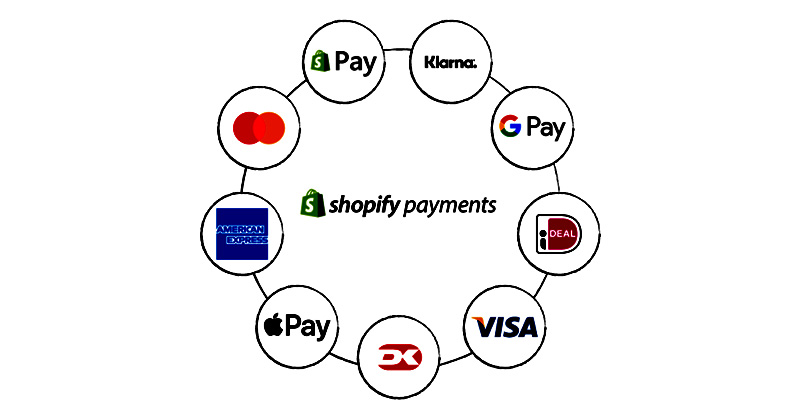
Shopify, on the other hand, provides Shopify Payments, which is considered its own payment gateway. This serves to increase process efficiency and guarantees timely release of payment.
Other than Shopify Payments, the platform supports a wide range of different payment gateways, like PayPal and Stripe, providing your customers with a variety of options.
24/7 Support

The successful operation of an online store hinges upon great customer service, a feature that Shopify offers in spades. Live chat, email correspondence, and phone assistance are all part of the 24/7 continual support service to ensure that you can always get help.
They offer plenty of information resources, discussion boards, and a user community where people share useful tips on many issues related to eCommerce Solutions.
Mobile Devices
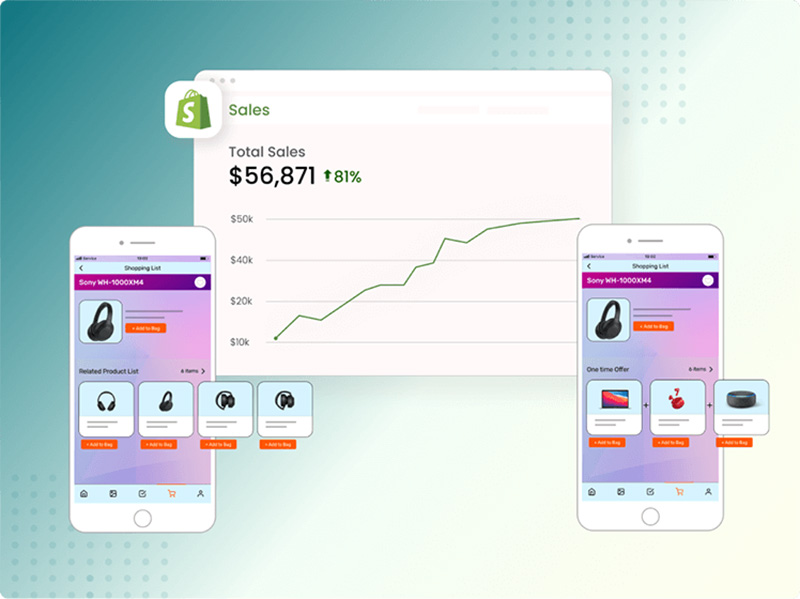
The store must be well prepared to be viewed on mobiles, given that they are ruling the market. Shopify’s themes are responsive, meaning the theme of your online store will look good on a PC or a smartphone.
This will also allow more potential clients to access your platform, whereby it will be simple for them to make purchases through the most convenient method they choose to use to complete a transaction.
Also read: Minimalism vs. Maximalism: Which one is best for E-commerce Web Design?
There are many reasons why selecting Shopify for e-commerce has a lot of advantages to ease the setting up and running of an online store. It is the perfect solution for businesses at any stage of development due to its friendly interface, adaptable features, wide selection of apps, and capacity to scale up or down in response to company demands. Becoming easier now, as you have a sound understanding of e-commerce website development costs.
Shopify Website Development Cost
- Themes & Templates: $0 – $350
- Monthly Application and Integration: $10 – $100+
- Customization: $500 – $5,000+
- Ongoing Monthly Marketing and SEO: $100 – $500+
- Configuration and Settings: $50 – $500
- Domain name: $10 – $20 per year
Cost of Shopify Development
There are three prime Shopify pricing options, serving the varying business needs, so let’s analyze each in detail:
Basic Plan
- Cost: $39 a month
- This plan is perfect for small, newly opened retail stores or start-up businesses.
- Features such as e-commerce, unlimited products, two employee accounts, 24/7 support, access to multiple marketing channels, and discount coupons.
- It provides basic reporting functionalities, with the option of manually placing orders.
Enhanced Plan
- Cash Value: $105/month
- Good for up-and-coming small businesses that are at the development stage and require a variety of new advanced features.
- Enhanced Plan All Basic-tier features are included in the Enhanced plan, plus added benefits such as professional reporting, five employee accounts, and better shipping discounts.
- Other additional functionality, like the ability to buy gift cards, along with improved reporting enhances the operation of operations.
Advanced Plan
- Cost: $399/month
- Suitable for small businesses or medium-sized businesses that dream bigger about growth
- Offers the Lowest-Priced Possible Credit Card Rates
- 15 employee accounts
- Comes with the powerful report builder
All the features in the Shopify Plan’s Advanced shipping options and third-party computed shipping prices will give more flexibility when working with large-scale operations. That said, which would be best for you? Business size requirements, and budget. Should your business grow to a point where the current needs of your business are not met, you can always switch up.
Custom Domain Name
A custom domain name can make your store seem that much more professional, giving your store a unique address online. There are some of the most important aspects to consider:
- As a rule of thumb, it should cost you anywhere from $10 to $20 every year for a Custom Domain, and you get one from Shopify or other suppliers.
- Although you can use a free subdomain on Shopify—yourstore.myshopify.com—clients perceive you as more reputable and professional if your domain reads something like yourstore.com.
- A unique domain name makes the brand easier to trust, find, and remember for customers.
Themes
Themes give definition to your store aesthetic and atmosphere on Shopify. It has a large bank of themes that suit all kinds of business needs and styles.

- Free Themes by Shopify Theme Store are best for newcomers to start with and come with very basic customization.
- Customization capabilities and critical design features are enhanced in premium themes, which will fall within the price range of $140 to $350. It would be a wise investment, really, in increasing your store’s beauty and making the shopping experience quite elevated.
- It is supposed to be borne in mind that, in the selection of themes, one is to keep into mind the business and the goods or services being offered with respect to the brand identity.
- A well-designed theme can make it very convenient for users to work on a website and it really does attract more traffic than normal.
Other Things to Consider
In budgeting for your Shopify store, it’s equally important to consider future costs regarding e-commerce website development costs, in addition to the startup ones. These other variables could increase or decrease your overall cost and thereby help you in better planning for a flawless e-commerce experience.
1. SSL Certificates
- It is hard to underestimate the role of an SSL in protecting your website and making sure that all user data is kept private. Here is a summary of their importance:
- SSL certificates protect critical information from hackers, such as credit card numbers and personal information, by encrypting the data exchanged between your website and clients.
- Whenever your website is equipped with an SSL certificate, most browsers will indicate this by displaying a padlock icon beside your URL. This will in turn serve to assure potential clients that access to your website is safe, therefore building confidence and trust in the business.
- A better ranking in search engines is one of the benefits of using SEO since Google and other search engines favor SSL-certified safe websites. Also, all Shopify stores are signed up for a free SSL certificate; thus, you will not need to bother about this expense. By default, it is already in the plan you have subscribed to.
2. Email Hosting
- You can be more credible with your business and create a much better avenue of communication with the clients when you have a professional email address like info@yourstore.com.
- A custom email address containing your domain name is more uniform in terms of branding and looks much more professional than some generic email, like yourstore@gmail.com.
- An email hosting service will help you get your own, unique mail address. Google Workspace gives this along with a number of other products, including Calendar, Docs, and Drive—all for $6 per user every month.
- With Zoho Mail, a customer gets email hosting among other business features for an overall cost of $1 per user per month. The entry-level option is the Mail Lite plan. – Depending on the package and class of service selected, email hosting costs can be anywhere from $1 to $12 per user per month.
3. Fees For Transaction
- The overview of transaction costs with regard to your Shopify store depends on the kind of payment gateway used.
- Shopify has also rolled out a payment gateway known as Shopify Payments. While using this service will save you on transaction fees, there will still be credit card processing fees: Basic Shopify charges 2.9% + 30¢, Shopify charges 2.6% + 30¢, and Advanced Shopify charges 2.4% + 30¢ for every transaction.
- 0.5% for the advanced Shopify plan
- 1.0% on the Shopify plan alone. If you decide to use an external payment gateway, like PayPal or Stripe, and integrate it with Shopify rather than using Shopify’s built-in equivalent, then it will incur transaction fees in addition to the credit card processing fees that come from the latter, depending on your membership plan.
- The prices are as follows: .05 % for Advanced/Shopify, 1% for Regular/Shopify, and 2% for Basic Shopify.
- Shopify adds 1.0% fees.
- Many sales can come with heavy transaction fees. Shopify Payments is one of the recommended ways to save on transactions and avoid them in general.
4. Shipping Expenses
- Comprehending shipping expenses is key to managing your finances when operating an e-commerce business as it constitutes a substantial component.
- You save on Shipping through Shopify’s preferred rates with large carriers such as USPS, UPS, and DHL Express.
- The shipping options open to your business can be free, flat-rate, or calculated based on order size and the location of the customer. All of these choices have their own cost considerations.
- Also, allow for money to be spent on packaging materials: boxes, bubble wrap, and tape. The cost of this varies depending on the mass and dimensions of your goods.
- Shipping costs will be different according to the volume, preferred carrier, and the availability of options for orders. These are things you will want to consider within a pricing plan so as to ensure profitability.
How Much Does An E-commerce Site Cost To Build
The development cost is one of the vast differences in platforms and features a business chooses to integrate into its e-commerce website. You could pay about $500 for a basic website or more than $10,000 on Shopify, depending on your needs and site sophistication.

How to Build a Store on Shopify
Starting an online business is easy and organized with Shopify. It has quite a user-friendly interface for configuration. Whether you are new to the entrepreneurial scene or have at least had some exposure to the business world, our guide will walk through all the key steps to help you effectively create an e-commerce website. Hold your breath, fellas, since we are about to dive really deep into Shopify knowledge here!
1. Register Now
Head over to Shopify.com to get started with creating a free trial account. You’ll be able to create a password and add your email address, then select a store name if you want to change it later, that’s quite alright.
There’s no pain in signing up. After this stage, Shopify will require details about your business—for instance, whether you’re in business already by using the sale methods or whether you’re getting started. All of this is to help personalize the setup process for your sake a personal shopper to put together an online store for you!
2. Pick Your Plan
It’s time to pick a plan that works for you as soon as the trial period ends.
It comes in three variants: Basic Shopify, Shopify, and the most elaborate, Advanced Shopify. A little like variable serving sizes at fast food places: “Do you want medium or large fries? Maybe for a beginner like you, I will give you only small fries.”
Shopify Basic offers services that answer the needs of startups, while Shopify Plus adds still more features that are perfect for extending and expanding enterprises requiring more sophisticated tools like advanced cart recovery.
Advanced Shop caters to big industrial players who need access to more business-oriented resources. You can always upgrade when you start getting some real traction, much the same as supersizing those mouth-watering French fries from time to time because you are really hungry!
3. Choose Theme
Think of a Shopify theme as your store’s clothes: it expresses your brand and creates a first impression of the kind of business you are. You can browse free and paid Shopify themes in the Shopify Theme Store. Apply filters by industry or another relevant criterion to narrow down that list before you start looking through live demos.
This is an opportunity to throw on so many outfits for your store until one says you. When ready, click “Add Theme”. Keep in mind you can always mix up your look with no care compared to keeping up with what’s current.
4. Personalise Your Brand
Get creative, and start customizing your store! Easy as can be, even if you’re not so technical, with Shopify drag-and-drop builder.
You can add your logo, change color schemes to those more suitable for your business, and further make changes in the layout, colors, and fonts of your website. Arrange different elements, such as product displays and homepage listings, until everything looks visually pleasing. It’s interior design for your perfect home environment!
Before releasing any changes, it is important to regularly evaluate the website to make sure that all of the changes are satisfactory.
5. Add Products
Here, you will get to show off the products. First, log into your Shopify admin panel and then click “Products” and then “Add Product.” Prepare all the information that is going to be required: product name, description, price, and images.
As a matter of fact, think about this like a dating site—first impressions make the difference, so use high-quality shots of each item in its most flattering profile! Write descriptions that are exciting and note down special qualities or advantages associated with each component. You can also create collections and let your customers browse your products easily!
6. Define Your Payment Options
Now, let’s talk about the money! Setting up payment methods is going to help your clients pay you. Within Shopify, a range of different options such as PayPal, third-party providers like Stripe, and Shopify Payments are available. First, go to “Settings” and then “Payments.”
Shopify payments are easiest because they integrate with your store and won’t charge extra for transactions. This can also be used to set up another kind of gateway if one’s preferences are more suitable, but with the chosen one, the timings of payout and fees taken on every transaction should be considered.
7. Start Your Own Store
Start the drums, please! Let everything be perfect; this site shall be marathoned by testing before its opening. The best time to open a store with a bang is now. Ensure everything is correctly set, product listings are correct, and checkout flows well before hitting that “Launch” button.
Web Development Agency: Centric Tech
Centric Tech is a professional web design agency New Jersey that delivers dynamic and user-friendly websites the way you want for your business. No matter whether you think about how to create a store on Shopify or how much it costs to develop a Shopify site, it’s all done in Centric Tech.
Shopify website development expertise lets us clearly guide how much it costs to build a Shopify website and, in the process, assures you of getting the best value for your investment. We truly understand how important knowing the answer to this most common question, ‘How much does it cost to make an e-commerce website?’, is. Our transparent pricing for e-commerce website development will let you plan things effectively.
Let Centric Tech help you turn your vision into commerce, done right, with a Shopify website that fits both your budget and timeline.
Conclusion
Now that your e-commerce business has launched, customers can begin browsing and buying right away! Once live, track performance metrics so you’re constantly modifying things to maximize sales and enhance the shopping experience with eCommerce web development services.
Congratulations! You have successfully developed your Shopify store. Now, sit back, relax, and wait for the orders. After all, managing a store is labor-intensive. However, Shopify is giving you all the weapons to win the battle. So maybe don’t get too comfortable just yet. Cheers to successful sales!
FAQs (Frequently Asked Questions)
Q: How much is a Shopify website?
Shopify websites can range in price from $500 to $10,000, depending on the plan chosen, additional features, themes, applications, and custom development.
Q: What are Shopify fees for?
Your Shopify fees include membership plan costs, transaction fees from using third-party payment gateways, and any additional costs related to purchasing premium themes, applications, or customized features.
Q: Is Shopify free for 3 months?
On Shopify’s website, promotional trials are regularly offered; however, they typically last no more than three months. Make regular visits to their website to be informed about their latest promotions and trial periods.
Q: How much does it cost to build an e-commerce site?
The costs associated with developing an e-commerce website differ based on features, design, platform, and development requirements. This can be a few hundred bucks or as much as $10,000 or more.
Q: How to build a store on Shopify?
You must first create an account in order to use Shopify to create an online store. After that, choose a layout and a theme to make your storefront unique. Next, add any required products to your inventory and alter the layout to suit your tastes. Set up payment options lastly before launching your completed website.
Final Thoughts
In 2024, there will be a number of expenditures associated with developing a Shopify website, from startup fees to ongoing costs for marketing and apps. Understanding these costs in advance and creating a suitable budget plan is crucial for the successful establishment of an e-commerce site that meets your enterprise needs.
A Shopify website’s price varies based on your goals and requirements. But with the right plan in place, you can create a remarkable e-commerce site that draws in clients and increases sales. Are you ready to get started? Investigate Shopify’s world and see how it may benefit your business!